Home > Using CampControl > Orders > All Orders > View/Edit an Order
View/Edit an Order
View this page in Español, Français, Português, Русский or another language.
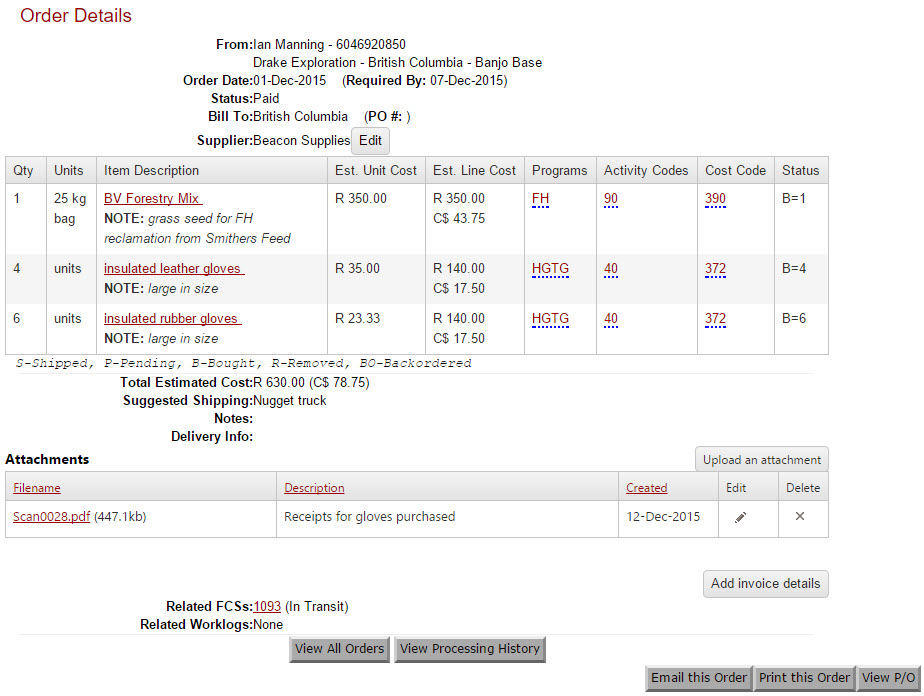
This screen displays the order details of a specific order. Details include the quantity, units and description of the order as well and who ordered it and when it is required, the suggested shipping and notes. The Accounting Codes are displayed for each line item (Programs, Activity Codes and Cost Code).
IMPORTANT: To view a summary of the order process, click Orders.
The Status of the order is annotated in italics below the order details. It summarizes the number of items and which status they’re in. The statuses are:
- S-Shipped
- P-Pending
- B-Bought
- R-Removed
- BO-Back ordered
eg. P=30 means that there are 30 items pending purchase.
Click on the item description to view the details of the item. The item may be a travel request in which case all the relevant details are displayed.
Click “View Processing History” to view the Audit trail of the Order. See Order Processing History for more details.
Click on the relevant buttons at the bottom of the page to Email, Print the order or view a Purchase Order (P/O).
If you would like to post a comment on this order, click on the “Add Comment” button. Comments
Attachments
You may also upload any number of attachments to the order. Examples of these are sales brochures, giving details on a specific item or the invoice.
Invoices
Adding of invoice information is done by clicking on the 'Add invoice details' button. See Invoices for more details on adding invoices.
Purchase Orders
The 'View P/O' button allows you to view, print and email purchase orders.
The email address defaults to the supplier's 'Purchase Order Email Address', which is configured for each supplier (see Add/Update Supplier).
The P/O can be downloaded as a PDF or emailed (a PDF attachment) directly from CampControl to the email address supplied.

You need the following permissions (see Manage Permissions):
To view this screen: "View Orders"
See also